  |
|
 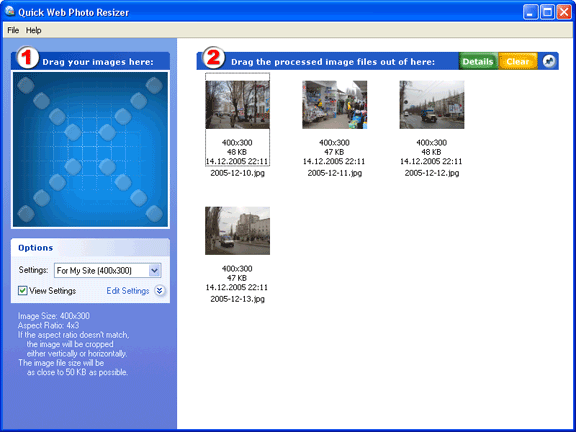 |
 Normally, you need to resize your digital photos or other images before uploading them to the Web or sending via e-mail. Quick Image Resizer offers an ingenious way of processing your images. You simply select a resizing scheme and drag images to the program's window.
|
|

Works with: Windows 10 $29, click here for detailed
pricing and order information. Our users say: This is a REALLY cool program. I don’t purchase much or try many things off the internet, but this product really makes this whole internet thing worthwhile. Joseph M. Howse Honey, I can't improve that tool at all... It's already perfect! Wow. Honestly. Teresa Robotham, I have used Quick Image Resizer to put a photo gallery up on my site. The software does the best job of batch resizing images that I have found so far. It is is exactly what I've been looking for to manage my gallery. I love the watermark feature, PNG/Alpha watermarking is something I thought only Photoshop would do for me! Matthew Hawke |
|||||||||||||||||||||
| Download and try it for free for 30 days:
To process a photo with Quick Image Resizer, just drag
and drop it from any folder of your computer (or from the desktop) into
the blue drop target of Quick Image Resizer. It will be
immediately processed with the settings that can be selected using the
special control below the blue drop target. Then just drag the finished
image file from the right part of Quick Image Resizer
wherever you like (to a folder on your computer, into a new email
message, upload to your web site, copy to a CD etc).
It's quick like never before! Just drag into the window, and then out
of the window.
|
|||||||||||||||||||||||||